
SEO For iWeb: How to get your iWeb Websites into Google & Other Major Search Engines
April 12th, 2008Update: The SEO for iWeb Walkthrough Video Tutorial has been released. It walks you through the entire process of optimizing your iWeb website for search engines, explaining everything step by step.
We always get questions from iWeb users asking how they can improve their website rankings. We also get comments that say RAGE Sitemap Automator doesn’t find all web pages on an iWeb site. Well there are a few reasons for this that we will discuss here.
UPDATE: As of version 2.0 of Sitemap Automator it will properly scan iWeb based websites, making it one of the only tools that is able to do this properly. However, the following tips are still essential for success with search engines. See our step by step video guide on creating an XML Sitemap file.
iWeb websites are not made to be search engine friendly. In fact, almost all iWeb based websites that we get are really hurting their search engine rankings. If you follow these few simple instructions, you will see some significant improvements.
1) iWeb Page Titles
As of iWeb 08 (and now iWeb 09), most built in templates have a large header caption at the top of the page. Your website’s title tag will actually reflect what you enter here. Many users simply keep this as the default caption, not utilizing the most important on-page optimization you can use for search engines.
The trick is to give your page a title that includes both the keywords you want to appear for in search engines and that accurately describes your website content. Your web page title appears at the very top of your web browser, and in a search engines results page. Search engines use your title tag to get an idea of what they will find on your website.
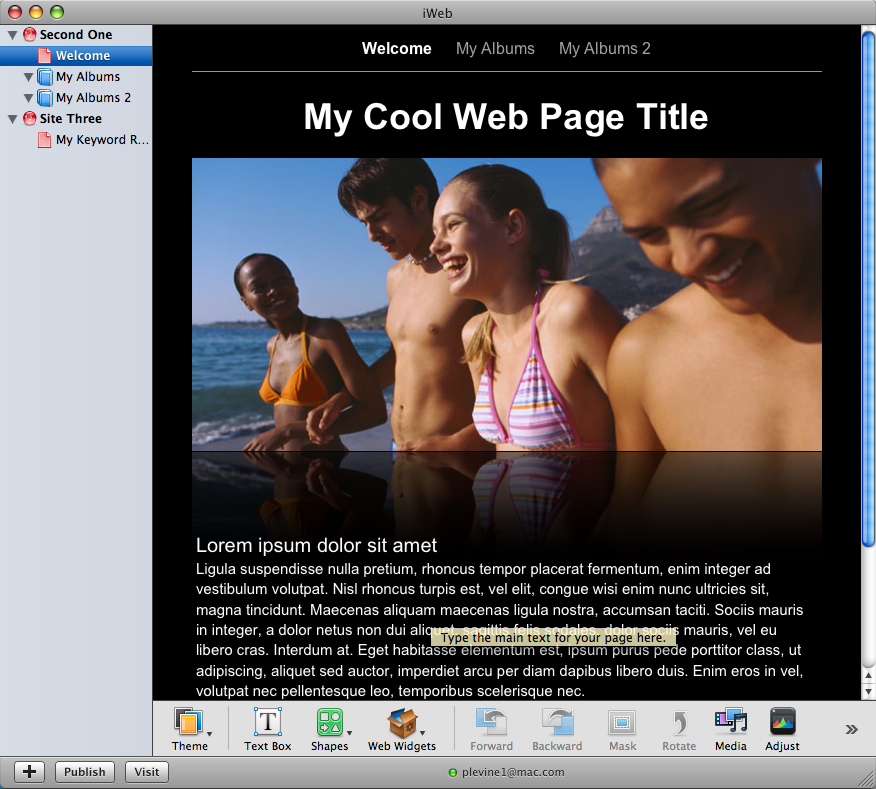
Update: With iWeb SEO Tool you can now edit your web page titles, meta tags and alternative image text after you publish your site. You no longer have to worry about how iWeb gets your title tag.
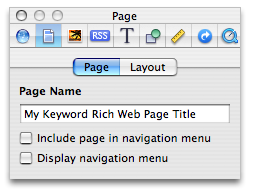
For templates without these header captions, or if you remove the caption, iWeb will use your page file name as its title. Below is a screen shot of your iWeb Inspector window which lets you edit the file name of your selected web page. Give it a good title using the advice we provided above.
2) Navigation bars
One of the biggest problems with iWeb is the way it creates your navigation bars. Instead of using standard HTML which search engines can use to correctly find all files on your website, it uses Javascript which makes it extremely hard for search engines to scan and index your website properly.
Fortunately there is a way you can work around this problem. Select your main page (or the first page that contains your navigation bar) and open the Inspector window. Click the Page Inspector tab (second tab) and deselect the option ‘Display Navigation Bar’ as shown in the following screen shot;
Now you’re going to create your own navigation bar with proper links to each of your pages. Create a new Text Box field and place it at the top of your page, while moving all your other content down. To quickly move all content down, go to Edit – Select All. Hold the shift key as you drag all your content down which will help insure you don’t accidentally move the content off center. Put the new Text Box at the top of your page and add captions for each of your pages separated using tabs or spaces so that they look like a proper navigation bar. Then select each caption and go to the ‘Link Inspector’ tab in the Inspector window. Select ‘Enable as a hyperlink’ and choose ‘One of My Pages’ from the ‘Link To’ drop down menu. Lastly select the page you want to link to from the ‘Page’ drop down menu.
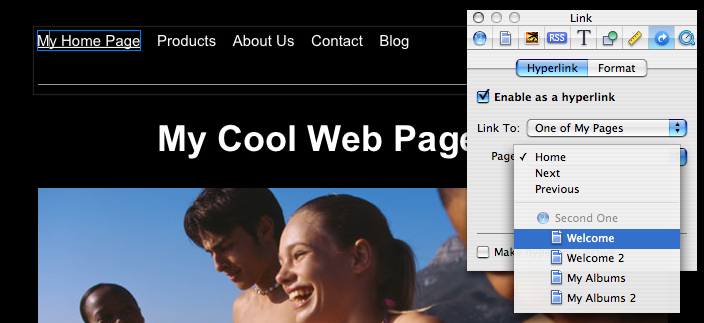
Although you should do this for each of your pages for best results, insuring you do it on your main page only is extremely helpful for search engines.
3) The Right Content
One of the biggest issues I see with iWeb created websites is users choosing non-standard web fonts for their website. Just to provide some background information, there are a number of fonts that are considered safe for use on the web. These are fonts that are guaranteed to be installed on a users computer no matter what operating system or web browser they use. If a font is not installed on a users computer and you use it on your website, it will not display properly for them. iWeb works around this issue by turning your text into pictures if you use a non-standard font. This is why your webpage always looks the same no matter where you view it. Unfortunately, search engines can not ‘read’ text that is turned into pictures and this will severely impact your potential search engines rankings.
You must stick to the standard web fonts, which are listed below for you. This insures that your website has the best possible chance of ranking high for the keywords you are targeting.
Web safe fonts include;
- Arial
- Courier New
- Georgia
- Times New Roman
- Verdana
- Trebuchet MS
- Helvetica
*Note: Some of the above fonts may not always be installed on a persons computer but will be easily replaced with a very similar looking alternative if they can not be found. That is why they have all been included in the above list.
You want to make sure that your website content contains the keywords you want to rank high for in search engines. It’s not good enough to “be in search engines”, you want to appear when a potential customer types in one of your keywords. Search Engines will not know what your webpage is about unless you include the proper keywords in your web page content.
4) iWeb Landing Pages
Lastly, something I see very often is users making a so called “landing page” as their home page. This is the type of page where it may simply show your company logo with a “Click here to enter link”. Basically anything that requires a user to take one more step in order to see your website is never a good thing.
This applies to search engines as well. Your home page is considered your most important page by default so make sure you are taking full advantage of it. Link to other important pages directly from your home page and make sure it includes keyword rich content.
In the next post I will go over some iWeb misconceptions as well as some search engine misconceptions that can typically affect iWeb users.
Remember, search engines will not simply choose your site out of the billions out there and rank them at the top of their search index unless you give them good reason too. Getting high in search engines for the keywords your customers are searching for can be extremely profitable to you and will take some time to achieve. Don’t expect immediate results and keep learning about the strategies you can employ to get high rankings.
Download our Free Mac SEO Guide to learn how you can get higher rankings with your iWeb websites.
 Twitter
 Facebook
 Youtube
 Blog RSS
December 23rd, 2009 at 8:05 pm
Hi Paul,
Thank you for being here! I wanted to clarify my understanding of the font issue in iWeb. In an ideal world I wanted to use a non-standard typeface throughout my website. My business partner hated that idea. So, we compromised with using a non-standard font, which also happens to be our logo font, on the image headers, and then Helvetica throughout. Then, we found out that people without our font installed could not see the alternate font on the headers. So, I am about to create the headers in illustrator with our logo font saved into the picture, so that it will remain as an image in iweb and will therefore (I assume) be visible to the viewer. Before I set out to do this, I happened to stumble upon your fabulous site. Here’s where I need clarity though. You say that with your iweb SEO tool we can create alternative Image text for our images making them visible to Search Engines. So, if we have a photo of a living room as the header and the words “JOLT design” over it, I can write in the alternative text “jolt design living room” or something like that? And that will allow it to be seen?
Secondly, are images with alternative text “equal to” regular text? In other words, If I am creating a special version of the header to allow for our alternative font, and then creating alternative text so it can be read, will that be the same to the search engines as just leaving the header text in a web-safe font?
Sorry so long-winded,
Jenny
September 5th, 2010 at 10:53 am
Hi, can anyone help?
I’m trying to add image tags to pictures within a slideshow on an iweb photos template page.
But, I cannot find the relevant files in the SEO tool to tag. If I don’t use a photo page template I can locate them but then don’t get the same viewing options.
Thank you in advance.
Tom
October 14th, 2010 at 4:55 pm
I built a custom NavBar on the home page. Copying it, and pasting it to new pages, works fine. Now all pages have the same NavBar.
When a new page is added, the NavBar is easily edited…HOWEVER: how can you program it so that the NavBar on all pages gets automatically updated at the same time, so that you don’t have to copy/paste the new NavBar to all pages separately?
October 29th, 2010 at 3:00 pm
I am a newbie with web page design.I created a business website on iweb and realized I needed webpage titles, metatag, and keywords to optimize my website on the search engines. I purchased godaddy visibility optimization and had a hard time running that program. I have searched the web and realized that I should download iwebSEO and manually enter my titles, keywords and metatags. I copied the website to a folder and then used iwebSEO to manually enter the data(titles, keywords, and metatags) and publish the website from iwebSEO.
It seamed like that none of the keywords and meta tags never appeared in the source code.
The first page title is still home not wastewater training. Also I can only get to my website Through the address http://www.bcengandww.com Could not get search for the website using google with keywords. Also godaddy visibility optimization did not work and their technical assistance said it was because my website had java code for the navigation button instead of hmtl code. I really do not know where to start. Please help
Thanks,
Bart
October 30th, 2010 at 12:08 pm
Hi Bart,
You have a lot of questions. All I can say is you need to take a look at our SEO for iWeb walkthrough video tutorial. It not only answers all of your questions but walks you through the process of optimizing your website for search engines so you can follow along and be sure you are doing everything correctly.
December 22nd, 2010 at 3:24 am
Hi Paul,
I am really new with this iweb software. I recently purchased my domain name from godaddy and was wondering what I needed to do next in order to get my website up and running on google. Do I have to pay for a web host along with using iweb in order to be found on google’s search engine?
Thanks so much for being so helpful.
December 22nd, 2010 at 5:38 am
@Sandra: You will need to purchase web hosting to get your website online. iWeb just creates a website for you, but hosting is required to get your site online. We offer iWeb compatible web hosting here. Once you set up web hosting, marketing your site and getting into Google can be achieved. We explain how to get your site ranking in Google for your keywords in our step by step SEO for iWeb Walkthrough Tutorial.
Please let me know if I can help you with anything else.
January 3rd, 2011 at 9:57 pm
I am rebuilding the nav bar per your instructions.
Two questions:
1) Must I uncheck “Include page in Navigation Menu”? Would leaving it checked confuse the search engines or would it give them more chance to find me?
2) Can I just copy and paste the new “nav bar” I have created for each of my pages, disabling the old one the same way I did the first?
January 11th, 2011 at 1:50 pm
If you keep that option checked, then it will make it more difficult for you to create your own custom navigation. This is because there would essentially be two navigation menus.
January 21st, 2011 at 1:34 pm
Hi,
I built a site using iWeb09 and GoDaddy is hosting it. I want to insert a hit counter and a space for comments on my blog however when I add this functionlity in iweb it doesn’t work.
How can I install a hit counter to my site?
How can I leave a space for comments on my blog?
Thanks,
Lindsay
January 23rd, 2011 at 4:25 pm
Hi Lindsay. This can be done by using iWeb SEO Tool. You can watch this video tutorial to learn how to do it. You can also learn a lot more ways to optimize your iWeb website for search engines with the iWeb SEO video walkthrough tutorial.
January 29th, 2011 at 7:20 pm
Using iWeb SEO Tool to upload my iWeb-designedf web site to an FTP server, I keep getting a “Directory already exists.” message and nothing happens on the status bar when I click the UPLOAD button. In talking to my web host, Pair.com, they say that they can see a connection is being made but nothing is getting uploaded and I don’t see any change in the source code indicating Google Analytics/Stat Counter snippets have been uploaded to my web site. No changes in the Title tags either. Any thoughts or suggestions? Thanks.
October 9th, 2011 at 1:37 am
Does anyone know of a iweb website that is ranked #1 top of the page?
October 9th, 2011 at 1:56 am
@Dom: There are many top ranking iWeb websites. It depends on the keyword they are targeting. See here for how customer’s have improved their iWeb sites; http://www.ragesw.com/testimonials.php
July 20th, 2012 at 10:51 am
I am reading the contents of this guide to SEO for iweb in July 2012. We know that Apple has stopped updating iweb although so many people (like myself) have spent time and effort creating their web sites. It could be because of the new operating systems be they Lion and the new Mountain Lion coming out next month or due to the new HTML5, BUT the fact is this makes viewing of all iweb sites soon obsolete. What can one do after spending almost a year creating their web site and not having the means to hire a web master and not being a super skilled technician…?
I have not figured out how all this functions it is filled with jargon that is beyond me and I am sure there must be someone who has a pedagogic manner of being clear, simple and precise in explaining complex technical data; I would really like to create better visibility for my web site and do not have the means right now to purchase all sorts of tools and accessories to explain the manner in which to make this a reality.
Are there more recent updates related to this topic of search engines, visibility and SEO tools for iWeb?
I would be very pleased to get some help.
Thank You,
Ashtan
July 23rd, 2012 at 10:46 am
You can still use iWeb for the foreseeable future, so I wouldn’t get too concerned over this right now. I suspect we have a few more good years with iWeb.
As for ranking higher, this guide you read is a great start. Other than that, we do have a lot of products that will help you out. Check out our SEO For iWeb Walkthrough Video Tutorial;
http://www.ragesw.com/videos/iweb-seo-video-tutorial.html
February 11th, 2013 at 12:10 pm
Recently published http://www.bonvin.se. This web site does not appear in Google search. As iWeb is not updated any longer can the recommended iWeb SEO video tutorial be of use to me today (February 2013)?
I understand that iWeb uses Javascript and that this is the great problem. Will the iWeb SEO video tutorial demonstrate how I can change Javascript or do I have to do that myself before using the iWeb SEO?
February 16th, 2013 at 5:20 pm
The iWeb SEO Video tutorial will teach you everything you need to know about getting your iWeb site in search engines and is certainly still relevant.
The video will teach you how to either make your own navigation bars or use Sitemap Automator to get search engines to recognize the default navigation bar created by iWeb.
Hope this helps.
March 19th, 2013 at 8:45 am
Using iweb
Hello
After successfully using your seo tool to publish my site (thanks) and make quite a few successful amends and additions
one day recently one (previously ok) page refused to publish – although the rest of the site appears online ok.
Since then i have tried deleting the page and remaking it and currently tried a test with a new blank page. The whole site previews ok in iweb but when i try to publish it i get this warning and online the whole site looks and works ok except for the blank test page
any thoughts or ideas would be appreciated! thanks steve
Can’t change directory to /public_html/Blank_files:
No such file or directory
March 31st, 2013 at 2:48 pm
@steve: Can you email customer support as there are a few reasons this may happen and we can help you better there.
April 20th, 2014 at 2:15 pm
Hi Paul!
Thanks for the great advice. I just have a quick question that I don’t see addressed in any of the other posts. If I change the default Iweb navigation bar by making my own navigation bar with hyperlinks what happens to my blogs and blog archive? Will people visiting my site be able to access it? Because on the “Blog” page you can only link the first page and not all the entries or the archive.