The new Retina Macbook Pro’s are simply beautiful. If you haven’t gotten a chance to try one, I highly recommend it.
We are working very heard to get all of our software updated for Retina displays starting with WebCrusher 2.3.
WebCrusher 2.3 includes support for Retina displays as well as a whole bunch of other fixes. You’ll find the software works a lot smoother as we made a lot of optimizations within the software.
WebCrusher is our website optimization tool that speeds up your website’s load time for your visitors in just a few second. Simply open your website in WebCrusher and let it do the rest. WebCrusher will work with any web building tool including; iWeb, RapidWeaver, Sandvox, Dreamweaver, WebDesign, MacFlux and more…
This update is free for registered users or you can download the free demo to try it out.
If you are keeping up with the world of SEO, you are probably aware of Google’s recent algorithm change known as ‘Penguin’ change which has affected the rankings of many websites. The update targeted websites whose back-links were not considered ‘natural’.
As we have mentioned in many of our tutorials, back-links should come naturally. Natural back-links typically occur when a website has something unique or interesting to offer, causing users to talk about it and place links to it in various places on the internet. Google’s ‘Penguin’ update now better determines the links that point to your website that Google finds to be unnatural.
So how do you tell if you have any of these unnatural back-links, and what can you do to correct it?
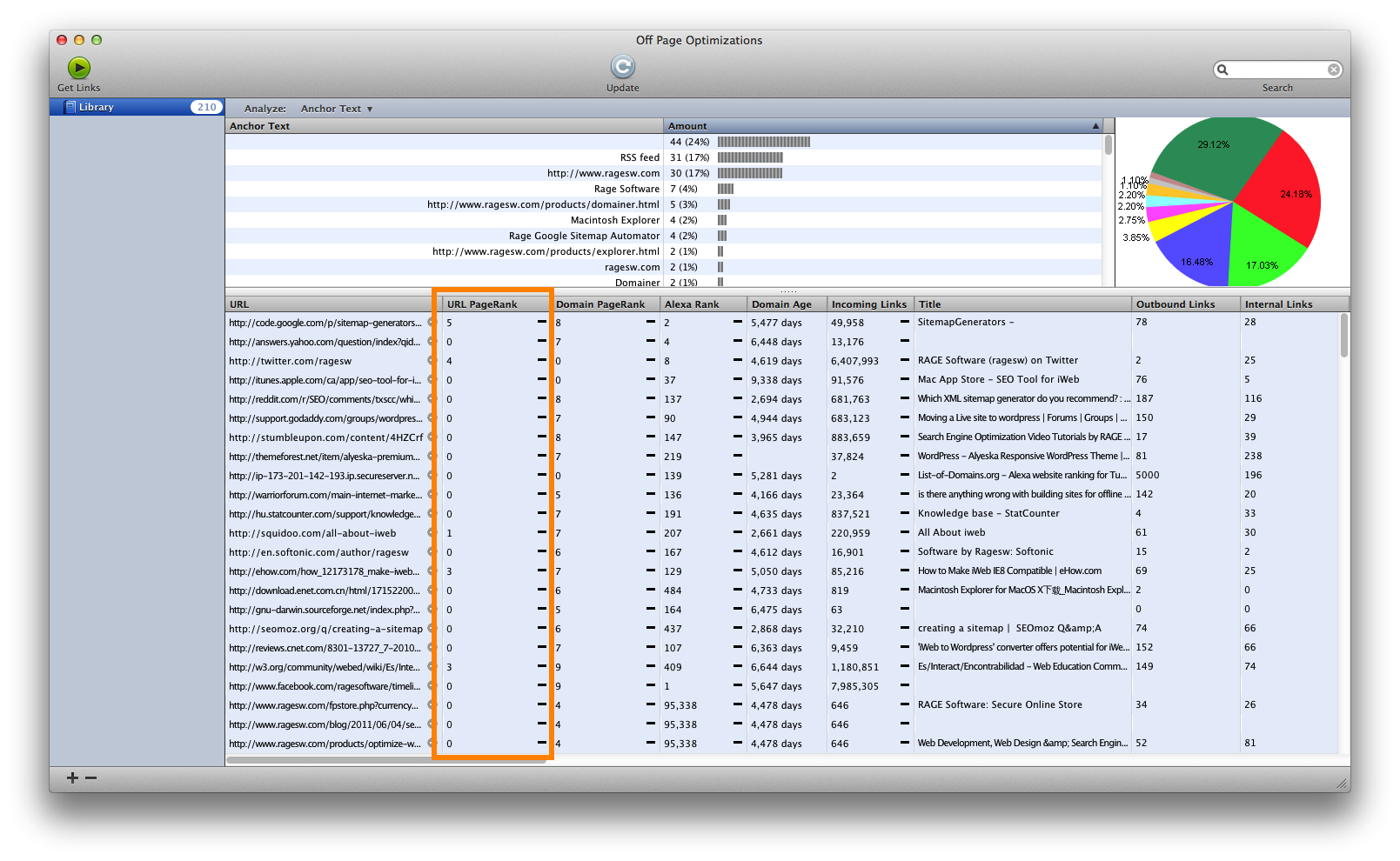
The first thing to do is a back-link check to see a nice list of the websites linking to your site. This can easily be done in SEIntelligence. Here is a screenshot of the results for 200 back-links to one particular page.
One of the things I want you to take note of is the Page Rank for that particular page that is linking to this site. For those of you not familiar with Page Rank, it is a score given to a web-page by Google. The score ranges from one to ten with ten being the highest. Pages obtain page rank when other websites link to them. For example, let’s say Page A on Site A has a page rank of 6. If Page A on Site A links to Page A on Site B, it is essentially giving a ‘vote’ to Page A on Site B. This in turn will give Page A on Site B some page rank. This is because Page A on Site B is a trusted source, and that trusted source is essentially saying that this page is good enough (or bad enough) to link to.
What you want to do, is make sure that the pages pointing to your site are from trusted sources. Page Rank is a great way to tell this. If all the pages linking to your page have zero page rank, it might look a bit suspicious, so just make sure you are getting links from a variety of pages, including pages with high page rank. Don’t just consider the Domain’s page rank, but pay close attention to the URL Page Rank as highlighted in the screenshot.
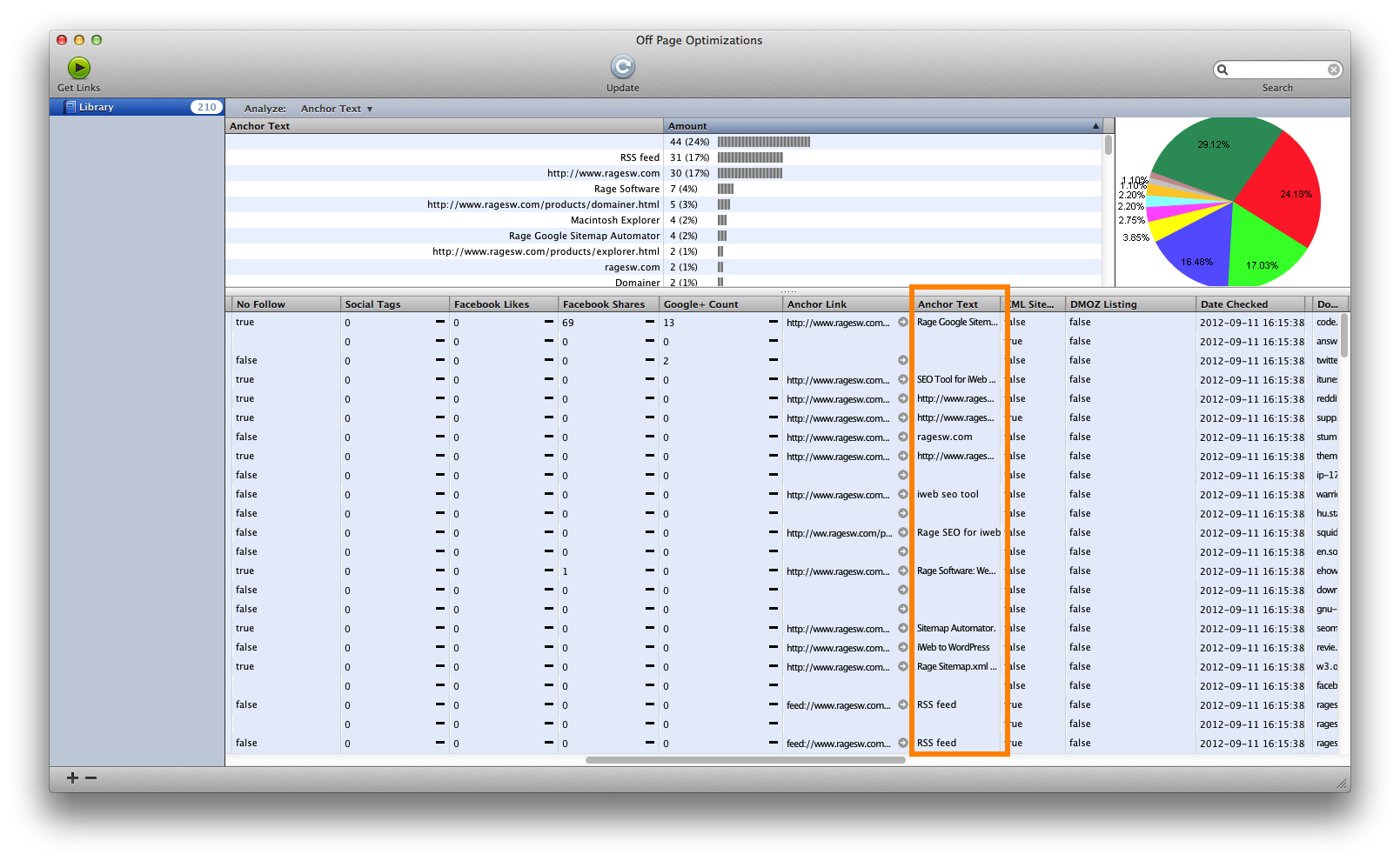
Another area of focus that users should pay attention to is the anchor text used by sites linking to your site. The anchor text is the exact text used in a link for users to click on to be taken to the linked-to website.
What you want to look out for is having the anchor text be the same for a large majority of the links pointing to your site. When the anchor text is the same, it might indicate that the user has added these links manually, which is not considered to be a natural way of link building. As a result, it could lead to loss of rankings.
So be sure to check out SEIntelligence and do a back-link check on your website. Ensure the sites linking to your site are considered ‘important’ with higher page ranks. Don’t forget to make sure that there is a good variety of anchor text from the websites linking to your site.
SEIntelligence 2.6.1 is now available. This versions improves website downloading features including the ability to download https websites and downloading individual pages once you have updated them online.
SEIntelligence is the professional search engine optimization software giving you step by step instructions on how to properly optimize your website for top search engine rankings.
SEIntelligence also includes a powerful back link scanner which will find all websites that link to your website and your competitor’s websites. Combined with its powerful analytical tools, SEIntelligence will help you determine where you need to improve your off page optimizations strategies.
A common error that users are experiencing when publishing from iWeb is the error communication with the FTP server. Typically, this error stems from a file on your site having an incorrect file name. This is a bug in iWeb that causes the error to appear and the site to not fully publish. This tutorial below will address this issue, and show you an alternative for publishing the entire site.
Video Transcript
If you publish your site from iWeb, and receive an error message that says “There was an error communicating with the FTP server. Try again later, or check with your service provider”, you most likely have a file on your site that does not contain a proper file name, and is giving iWeb a hard time with publishing. This is a bug in iWeb, and because of this, you will not be able to publish your site through iWeb and many other FTP clients.
Unfortunately, we are not told which file or files are causing this, so locating the issue to remove it can be difficult.
Luckily, iWeb SEO Tool is able to handle this issue and can publish the site as is. I will show this by publishing this exact same website that gave me this error.
First, I will publish the site to a local folder.
Now I will launch iWeb SEO Tool, and load the folder that I just published from iWeb.
Next, I will click on the Publish button and enter my FTP details. I keep my FTP details bookmarked in iWeb SEO Tool, so all I need to do is click on the FTP account and all my information will appear. You can do this also by first filling out your FTP information and then clicking this plus sign down here.
So now I will click on the Upload button and publish my site. I will fast forward through the publish so that you can see at the end, my site has been published successfully, and I received no error message like I received in iWeb.
I just want to remind everyone that iWeb SEO Tool is free for any RAGE Web Hosting user who is signed up for at least one year, so if you are looking to use iWeb SEO Tool to help publish your site, I highly encourage taking advantage of the free iWeb SEO Tool promotion as well.
As MobileMe is being discontinued in less than 2 weeks, many users are discovering that publishing their website to an FTP server sometimes produces cryptic errors that prevent your website from being published.
This is actually a bug in iWeb, and in most FTP publishing tools. Fortunately we have fixed this publishing bug and included it in our newest release of iWeb SEO Tool.
Now you can make sure your website lives on once MobileMe goes away on June 30th.
Plus, iWeb SEO Tool is free for users who have signed up to our iWeb Web Hosting for a year or more. Make sure your iWeb sites work perfectly with our iWeb Web Hosting and iWeb SEO Tool.
We have just released an update to WebCrusher – our utility that optimizes website’s so that they load faster in your web browser. The following updates and fixes have been added to this latest release:
[NEW] Improved Javascript optimizations
[NEW] Faster website optimizations
[FIX] Fixed problem with publishing websites to an FTP server
[FIX] Fixed certain optimizations with iWeb sites on Internet Explorer for Windows
We have just released an update to SERank, our powerful search engine ranking tool which allows users to check their website’s rankings in multiple search engines for multiple keywords.
SERank 2.6.2 includes a dozen new local search engines, as well as fixes issues pertaining to the rank Change column. If you were/are receiving a N/A in the change column instead of the usual red number for a decrease, green number for an increase, or grey number for no change, please update your copy of SERank. Make sure to perform the search at least two times in order to get rid of the N/A.
Extra characters being added to the URL has also been corrected.
SERank 2.6.2 is a free update for all registered users. Download the SERank demo and try it out for free.
Sitemap Automator, our easy-to-use XML Sitemap creator has been updated to include a couple of fixes. Sitemap Automator now shows the proper source of broken links, as well as some fixes for various website scanning issues.
We have just released SEIntelligence 2.5, a major upgrade to our most popular SEO tool. SEIntelligence makes it extremely easy to optimize your website for all major search engines by providing step by step instructions on what you need to change in order to rank higher.
SEIntelligence also provides a detailed report on incoming links to your website and your competitor’s websites. In addition to providing important SEO metrics it also social networking metrics including Facebook Likes, Delicious Tags and now even Google Pluses.
SEIntelligence 2.5, a free update for registered users, provides even more incoming links for any website and adds supports for Google Plus. Now you can see how many times any website has been added to a user’s Google Plus account. SEIntelligence 2.5 also fixes some important bugs and adds additional local search engines to help get your top competitors.
Download the SEIntelligence demo for free to try it out.

 Twitter
 Facebook
 Youtube
 Blog RSS